✦ iPhone, iPad, iPhone Duo & Apple Watch • 4.9 ★ App Store
Stop swiping. Speak, your script and slides follow.
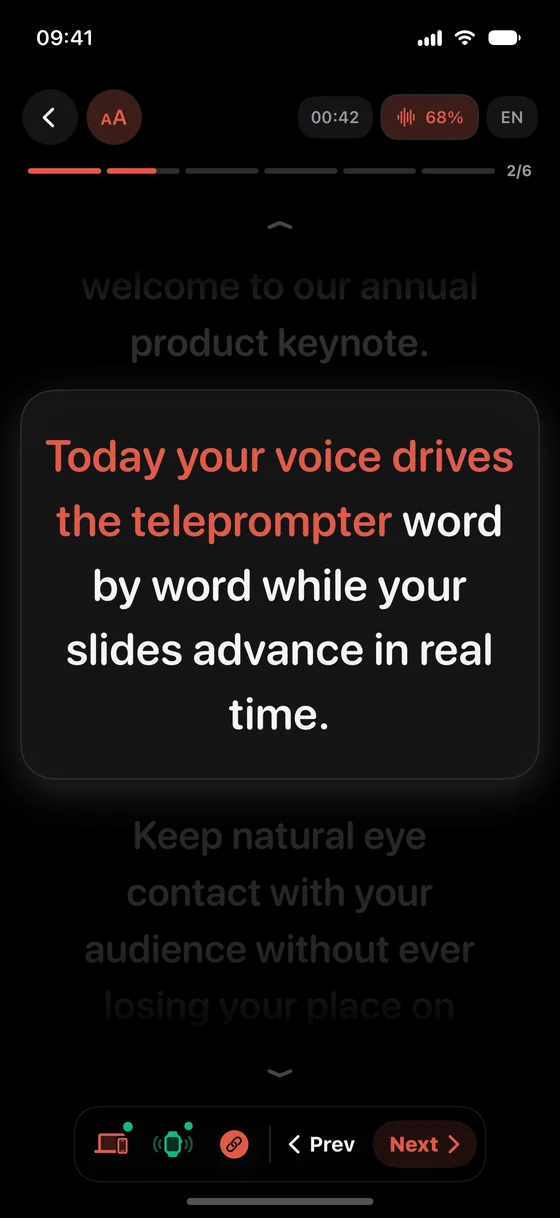
VoxPresenter tracks your voice word by word 100% on-device (offline capable), extracts your PowerPoint (.pptx) speaker notes slide by slide, and advances Mac & Windows PC presentations wirelessly from your iPhone or Apple Watch.
Try Free on the App StoreFree to start • 100% Private On-Device • Low Annual or One-Time Lifetime Option
ON MAC OR WINDOWS PC?Scan with your iPhoneInstantly opens the iOS & watchOS App Store
100% Offline Voice Tracking (35+ langs)3-Mode Apple Watch RemotePowerPoint & Keynote Sync (Mac & PC)45° Studio Mirror & iPhone Duo
WHY SERIOUS SPEAKERS SWITCH
Built for live keynotes, lectures & studios — not rigid TikTok timers
Standard teleprompters (Teleprompter.com, CapCut, Teleprompter Pro) scroll at a mechanical timer that runs away the moment you pause. BIGVU locks you into cloud selfie editing. PromptSmart Pro charges $100–$200/year yet cannot advance a single PowerPoint slide. VoxPresenter unifies voice, stage, and slides.
01 • 100% ON-DEVICE VOICE TRACKING
Your voice sets the pace — even in Airplane Mode
Pause for applause, take an audience question, or improvise off-script. VoxPresenter waits silently and locks back onto your line the instant you resume—100% locally on Apple Silicon with zero cloud uploads.
02 • NATIVE .PPTX + MAC & WINDOWS BRIDGE
Read PowerPoint notes on iPhone, advance slides on PC or Mac
Import any .pptx deck in 2 seconds: speaker notes are extracted slide by slide with [SLIDE] cues, wirelessly advancing PowerPoint, Keynote, Google Slides, or Canva on both Windows PC and macOS.
03 • WRIST & STUDIO PRECISION
3-Mode Apple Watch, 45° OLED Mirror & iPhone Duo Console
Click slides eyes-free with wrist haptics on Apple Watch, shoot through 45° beam-splitter glass with zero layout shift, or unfold the 50/50 Split Stage Console on iPhone Duo.
HOW IT WORKS
Stage-ready in 30 seconds
01
Import .pptx, Word, PDF or paste
Open PowerPoint (.pptx speaker notes), Word (.docx), or PDF files directly—or paste any script into your local library.
02
Speak at your natural pace
On-device neural speech recognition tracks every word in real time across 35+ languages with zero network latency.
03
Script & slides advance hands-free
Your prompter scrolls automatically and triggers Mac/Windows slide changes by voice or via haptic tap on Apple Watch.
STAGE & STUDIO ENGINEERING
Every detail crafted for confident delivery
100% On-Device Privacy
Zero audio recordings and zero confidential executive decks ever touch a cloud server. Works reliably in underground conference halls.
Zero-Layout-Shift Highlighting
Active word-by-word karaoke highlighting never alters font weight or line breaks—so your eyes never lose their anchor.
Improvisation-Tolerant Engine
Hesitate, rephrase, or skip ahead: the speech matcher adapts smoothly without jumping erratically.
45° Beam-Splitter Mirror Mode
1-tap horizontal and vertical optical flip on a pure OLED black (#000000) canvas for Elgato, Neewer, Desview, and broadcast rigs.
Multi-Speaker @Name / [Name] & WPM Stats
Automatic color-coded @Alice or [Bob] cues for panels and interviews, plus post-session WPM pace and accuracy analytics.
Fair Pricing + Lifetime Unlock
Start free, test Pro with a 3-day free trial, and pick a fair annual plan or a One-Time Lifetime purchase—no $180/yr subscription trap.
INCLUDED WATCHOS COMPANION
Your 3-mode stage remote right on your wrist
Leave plastic USB dongles behind. Control PowerPoint (Windows & Mac), Keynote, Google Slides, and your teleprompter from your Apple Watch in pure OLED Studio Noir:
MODE 1 • EYES-FREE STAGE
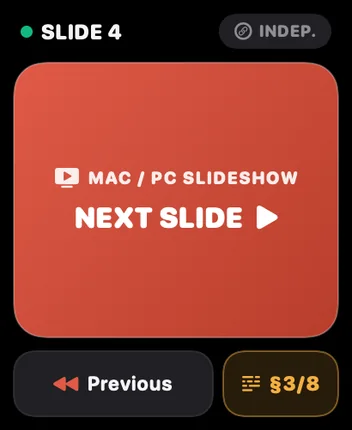
Giant Haptic Slide Clicker
Advance Mac or Windows PC slides without ever glancing down thanks to a full-screen Terracotta target and crisp directional wrist haptics.
MODE 2 • DUAL-DECK
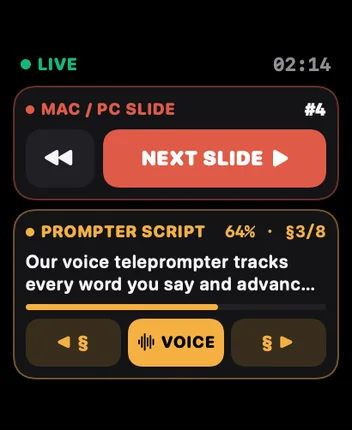
Independent Slides + Script
Trigger desktop slides on the top deck (Terracotta) and step through teleprompter paragraphs on the bottom deck (Amber) with distinct vibrations.
MODE 3 • DIGITAL CROWN
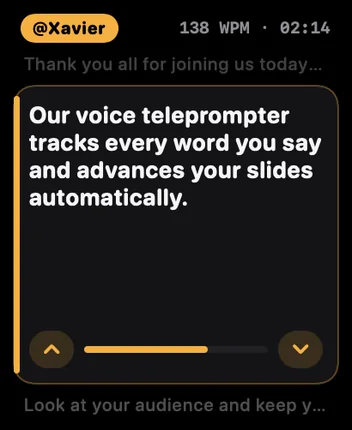
Live Wrist Prompter & Crown
Check your active cue right on your wrist while walking a wide stage and fine-tune scrolling smoothly with the Digital Crown.
45° MIRROR MODE & STUDIO RIGS
Engineered for professional beam-splitter teleprompter glass
Shooting YouTube videos, courses, or broadcasts through 45° angled beam-splitter glass? Flip your script in one tap so you look straight into the camera lens with zero light bleed.
Test optical mirror flip live:
Vertical optical flip calibrated for 45° angled studio beam-splitter glass
Horizontal left/right mirror and full 180° portrait/landscape support
True OLED black (#000000) background eliminates glass reflections
Supports iPhone, iPad, and unfolded iPhone Duo 50/50 Stage Console
Direct Mode (iPhone / iPad Screen)
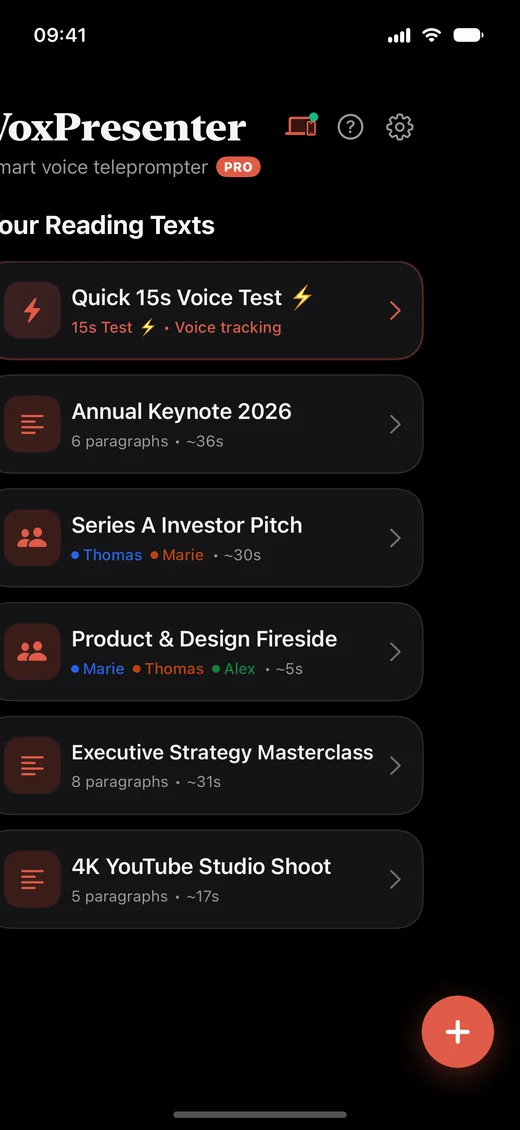
REAL DEVICE SCREENSHOTS
High-contrast Studio Noir interface
Script Library & .pptx / PDF Import
Zero-shift live voice tracking
45° Beam-splitter mirror mode
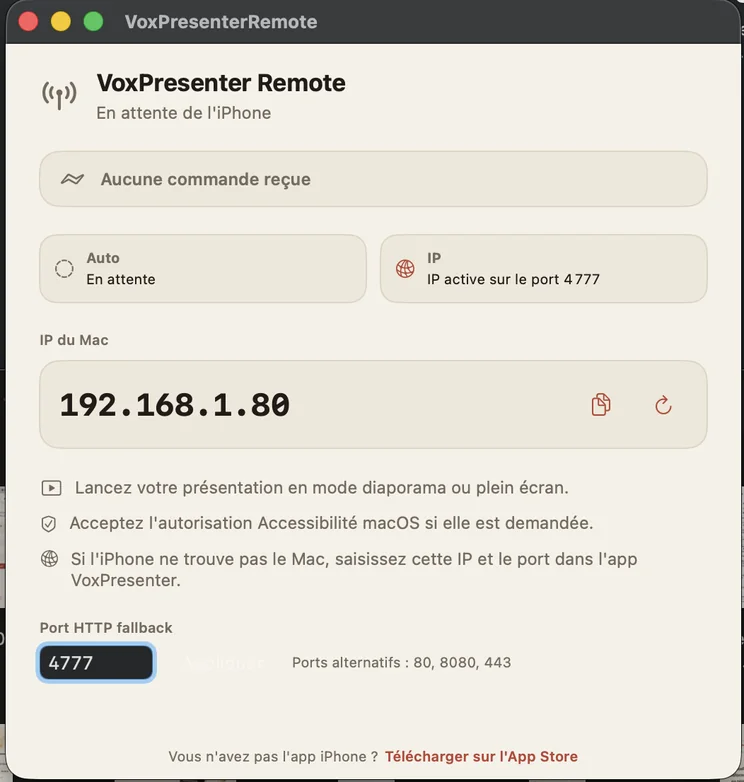
FREE MAC & WINDOWS PC COMPANION
Wireless slide control for PowerPoint, Keynote, Google Slides & Canva
Unlike Apple's built-in Keynote remote (which only works with Keynote on Apple devices), the free VoxPresenter Remote app runs on both macOS and Windows PC. Advance slides automatically by voice at [SLIDE] cues or manually from your wrist.
Works with Microsoft PowerPoint, Apple Keynote, Google Slides, Canva & PDF
Auto-discovery on Mac & instant local Wi-Fi IP connection on Windows PC (or iPhone Hotspot)
How does VoxPresenter's real-time voice scrolling work?
VoxPresenter runs on-device neural speech recognition directly on your iPhone or iPad. As you speak the words of your script aloud, it highlights your live position with zero layout shift and scrolls smoothly at your exact natural cadence—pausing automatically whenever you pause or improvise.
How can I read PowerPoint (.pptx) speaker notes on my iPhone while advancing slides on a Windows PC or Mac?
Import your .pptx presentation directly into VoxPresenter on iPhone or iPad: every slide's speaker notes are extracted automatically with [SLIDE] markers. Open the free VoxPresenter Remote companion on your Windows PC or Mac over local Wi-Fi (or Personal Hotspot) to trigger PowerPoint, Keynote, Google Slides, or Canva slides automatically by voice or from your Apple Watch.
Does VoxPresenter work 100% offline in Airplane Mode on stage?
Yes. Across 35+ languages supported by Apple's on-device speech models, voice tracking runs completely offline on your device. Zero audio and zero slide notes are uploaded to any server, making it safe for confidential corporate keynotes and auditoriums with flaky Wi-Fi.
What are the 3 modes on the Apple Watch stage remote?
The included Studio Noir watchOS app gives you: (1) an Eyes-Free Haptic Slide Clicker with a full-screen Next Slide button, (2) a Dual-Deck split screen controlling Mac/PC slides on top and teleprompter paragraphs on the bottom, and (3) a Live Wrist Prompter with Digital Crown scrolling.
Why choose VoxPresenter over PromptSmart Pro, BIGVU, Teleprompter.com, or CapCut?
Teleprompter.com and CapCut rely on fixed-speed timers that keep scrolling when you pause. BIGVU is a cloud-heavy social video editor for TikTok captions. PromptSmart Pro charges ~$100–$200/year yet cannot import PowerPoint (.pptx) slide cues or control Mac/Windows presentations. VoxPresenter combines offline voice tracking, wireless Mac/Windows slide control, a 3-mode Apple Watch remote, 45° Studio OLED mirror mode, and a One-Time Lifetime option.
Does it work with physical 45° beam-splitter teleprompter glass rigs?
Yes. One tap flips the pure black (#000000) Studio OLED display vertically or horizontally for any 45° studio teleprompter glass rig (Elgato, Desview, Neewer, Glide Gear) on iPhone or iPad.
Ready to own the room on your next presentation?
Download VoxPresenter free on iPhone, iPad, and Apple Watch. Test real-time voice tracking in 15 seconds.